Find RTO Details by Vehicle Number & RTO Code
RTO (Regional Transport Office) manages vehicle registration, driving licences, RTO codes, and other transport-related services across India. Find RTO details by vehicle number or RTO code, including registration information, RTO office details, and related services.



Explore Everything About Your Vehicle





Regional Transport Office (RTO)
The Regional Transport Office (RTO) is a government office that operates under the Transport Department of the respective state or UT. It provides various transport-related services, including vehicle registration, issuing driving licences, renewing Registration Certificates (RCs), and more. Every state and Union Territory has its own RTOs, such as Haryana RTO, Telangana RTO, and Maharashtra RTO. Major cities may also have dedicated RTO offices, each identified by a unique RTO code. This code helps identify the specific region where a vehicle is registered.
What is a vehicle registration at RTO?
Vehicle registration is an important function done by the RTO. Every vehicle must be registered at the respective RTO - which means the[ vehicle owner details](vehicle details) are updated in the database and are linked to the owner. If not, an RTO challan can be issued against the vehicle. Not only this, the licence plate and Registration Certificate (RC) is also issued at the time of registration.
The registration is of two types:
Temporary vehicle registration
Permanent vehicle registration
Temporary vehicle registration
Temporary registration allows a newly purchased vehicle to be legally driven for a limited period before permanent registration is completed. With temporary registration, the vehicle can easily move to the state in which it would be registered.
The provision for a temporary registration of vehicles is defined under Sec. 43 of Central Motor Vehicles Act. The temporary vehicle number is provided by the dealership from which the vehicle is purchased and is valid for a month, after which the vehicle needs to be registered permanently.
Documents required
The documents needed are:
- Application in Form 20
- Sales certificate in Form 21
- Road worthiness certificate in Form 22
- Valid insurance certificate
- Proof of address*
- Pollution under control certificate*
- Copy of PAN card or Form 60 and Form 61 (as applicable) *
Can a temporary vehicle registration period be extended?
Yes, depending on the case, it can be extended. However, the vehicle owner needs to request an extension of the temporary vehicle registration period. The vehicle owner should apply for extension of the period to the Registering Authority, the date till which you need the extension along with specifying the genuine reason.
Terms and conditions
- The extension can be applied for a maximum of two times.
- If you have already applied for extension earlier and are requesting again, you need to pay a penalty as per the Central Motor Vehicle Rules (CMVR), 1989.
- Fees and penalty for extension are defined under Rule 81 of CMVR, 1989.
Documents required for RTO registration
For extension of temporary registration, the following documents are required:
- Sales certificate in Form 21
- Road worthiness certificate in Form 22 from the manufacturers (Form 22A from the Body builder)
- Pollution under control certificate
- Valid insurance certificate
- Proof of address
- Design approval copy of STA in case Trailer or Semi-Trailer
- Original sales certificate from the concerned authorities in Form 21 in case of ex-army vehicle
- Note: (*) signifies that the document requirement may vary depending on the state.
Permanent vehicle registration
As per the provision of section 39 of Motor Vehicles Act, 1988 a vehicle should be registered by the registering authority to be driven or allowed to be driven in the public place. The application for permanent registration should be submitted within 7 days from the date of taking the delivery of the vehicle (excluding the journey period).
Important terms and conditions
There are some important terms and conditions associated with the application process of permanent RTO vehicle registration and they are:
- In case the vehicle is registered temporarily, the permanent registration should be made before the expiry of the defined period i.e. 1 month.
- Ensure if there is hypothecation involved in the registration process.
- Ensure what type of registration number is it - fancy, choice or general number.
- The payable fee defined under Rule 81 of Central Motor Vehicle Rules 1989 depends upon the type of registration number and use of HSRP/smart card.
- Pay tax as defined under CMVR 1989.
Documents required
- Application in Form 20
- Sales certificate in Form 21
- Road worthiness certificate in Form 22 from the manufacturers (Form 22A from the Body builder)
- Pollution under control certificate (PUCC)
- Valid motor insurance certificate
- Proof of address
- Design approval copy of STA in case Trailer or Semi-Trailer
- Original sales certificate from the concerned authorities in Form 21 in the case of ex-army vehicle
- Custom's clearance certificate along with licence, and bond in case of imported vehicle
- Temporary registration, if any
- Form 34 (in case of HP endorsement)
- Copy of PAN card or Form 60 and Form 61 (as applicable) *
- Permit proceedings in case of transport vehicle*
- Municipal Corporation parking fee*
- Dealer and manufacturer invoice*
- Passport size photographs*
- Proof of Date of Birth*
- Chassis & Engine Pencil Print*
- Form CMV Form 22A in case of Body built vehicle (EX. Goods vehicle, bus etc.)*
- Bonafide agriculture certificate issued by Tehsildar in case of registration of tractor-trailer unit used for agriculture*
- Form-A under Taxation Act, 1997* Note: (*) signifies that the document requirement may vary depending on the state.
How to check vehicle registration details online?
Once a vehicle is registered with the concerned RTO/RTA, its registration records are added to the relevant government database. You can check available vehicle registration details online through - Parivahan and Park+.
The steps to check vehicle details are as follows:
Parivahan
Parivahan is a Government of India portal that provides various vehicle and transport-related services online.
- Visit the official website of Parivahan.
- Hover the cursor over ‘Informational Services’ and select ‘Know Your Vehicle Details’.
- Enter your mobile number to access vehicle and driving licence details.
- Complete security verification by entering the shown code and click on ‘Get OTP’
- Enter the received OTP to check the vehicle registration details.
Park+
Park+ allows users to check available vehicle and owner details online using the vehicle registration number.
- Visit Park+ and click on ‘Vehicle Owner Details’.
- On the ‘Vehicle Search’ page, enter the vehicle number (number plate).
- Click on ‘Check Details’ to know the vehicle owner and registration details. Note: Park+ may ask for OTP verification for security/confidential reasons.
What are the major types of RTO forms?
RTO online forms serve as a formal request while availing any service from the RTO. Though RTO works extensively and handles several verticals - including tons of forms, but some of the most crucial forms relating to vehicle details, DL, motor vehicle are listed below.
| Form Category | Form No. | Description |
|---|---|---|
| Driving License | Form-1A | Medical certificate |
| Driving License | Form 2 | Form of Application for Learner’s License /Driving License / Addition of a New Class of Vehicle/Renewal of Driving License/Change of Address Or Name |
| Driving License | Form 3 | Learner’s Licence |
| Driving License | FORM 4A | Form of Application for issue of international driving permit to drive a motor vehicle in other countries |
| Driving License | Form 5 | Driving Certificate issued by Driving School of Establishments |
| Driving License | Form 5A | Certificate of fuel efficient driving training issued by driving school or establishment |
| Driving License | Form 5B | Driving certificate issued by accredited driving training center |
| Driving License | Form 6A | International Driving Permit |
| Driving License | Form 7 | Form for Driving Licence (Laminated / Smart Card Type) |
| Driving License | Form 8 | Form of Application for permanent surrender of Class or Classes of vehicles from Driving License |
| Driving License | Form 10 | State Register of Driving Licence |
| Driving License | Form 10A | Form of national register of driving licenses |
| Driving License | Form 11 | Form of Licence for the Establishment of a Motor Driving School |
| Driving License | Form 11A | Accreditation for driver training center |
| Driving License | Form 12 | Form of Application for a Licence to Engage in the Business of Imparting Instructions in Driving of Motor Vehicles |
| Driving License | Form 12A | Application for accreditation of driver training center |
| Driving License | Form 13 | Form of Application for Renewing a Licence to Engage in the Business of Imparting Instructions in Driving of Motor Vehicles |
| Driving License | Form 13A | Application to renew accreditation of driver training center |
| Driving License | Form 14 | Register showing the Enrolment of Trainee(s) in the Driving School Establishments |
| Driving License | Form 15 | Register Showing the Driving Hours spent by a Trainee |
| Motor vehicles Dealer Related | Form 16 | Form of Application for Grant or Renewal of Trade Certificate |
| Motor vehicles Dealer Related | Form 17 | Form of Trade Certificate |
| Motor vehicles Dealer Related | Form 18 | Intimation of Loss of Destruction of a Trade Certificate and Application for Duplicate |
| Motor vehicles Dealer Related | Form 19 | Register to be maintained by the Holder of Trade Certificate |
| Vehicles Related | Form 20 | Application for Registration of a Motor Vehicle |
| Vehicles Related | Form 20B | Application for extension of period of temporary registration |
| Vehicles Related | Form 21 | Sale Certificate |
| Vehicles Related | Form 22 | Certificate Road-Worthiness |
| Vehicles Related | Form 22A | Certificate of Compliance with Pollution Standards, Safety Standards Road Worthiness (for Vehicles where body is Fabricated Separately) |
| Vehicles Related | Form 22B | Initial self-certificate of compliance of the bus body built on drive away chassis by the bus body builder to the provisions of the Code and Practice for Bus Body Design |
| Vehicles Related | Form 22C | Request and permission for alteration / Retrofitment/ adaptation |
| Vehicles Related | Form 22D | Endorsement of alteration / Retrofitment |
| Vehicles Related | Form 22E | Request for endorsement of adaptation |
| Vehicles Related | Form 22F | Compliance report for alternation/Retrofitment |
| Vehicles Related | Form 22G | Compliance report for adaptation of motor vehicle |
| Vehicles Related | Form 23A | Certificate or Registration (in Electronic Medium as Smart Card, etc.) |
| Vehicles Related | Form 23B | Temporary certificate of registration |
| Vehicles Related | Form 24 | Registration of Motor Vehicle |
| Vehicles Related | Form 25 | Form of Application for Renewal of certificate of Registration of Motor Vehicle, other than a Transport Vehicle |
| Vehicles Related | Form 26 | Application for the Issue of Duplicate Certificate of Registration |
| Vehicles Related | Form 27 | Application for Assignment of New Registration Mark to a Motor Vehicle |
| Vehicles Related | Form 27A | Application for assignment of new registration mark in BH-Series |
| Vehicles Related | Form 28 | Application and Grant of No Objection Certificate |
| Vehicles Related | Form 29 | Notice of Transport of Ownership of a Motor Vehicle |
| Vehicles Related | Form 29C | Intimation to the registering authority, about the fact of delivery of vehicle to authorized dealer of registered vehicles |
| Vehicles Related | Form 29D | Intimation to the registering authority, about taking back of vehicle from authorized dealer of registered vehicles |
| Vehicles Related | Form 30 | Application for Intimation and Transfer of Ownership of a Motor vehicle |
| Vehicles Related | Form 31 | Application for Transfer of Ownership in the Name of the person Succeeding to the Possession of the Vehicle |
| Vehicles Related | Form 32 | Application for Transfer of Ownership in case of a Motor Vehicle Purchased or Acquired in Public Auction |
| Vehicles Related | Form 33 | Intimation of Change of Address Recording in the Certificate of Registration and Office Record |
| Vehicles Related | Form 34 | Application for Making an Entry of an Agreement of Hire-Purchase / Lease / Hypothecation Subsequent to Registration |
| Vehicles Related | Form 35 | Notice of Termination of an Agreement of Hire-Purchase / Lease/ Hypothecation |
| Vehicles Related | Form 36 | Application for Issue of a Fresh Certificate of Registration in the Name of the Financer |
| Vehicles Related | Form 37 | Notice to the Registered Owner of the Motor Vehicle to Surrender The Certificate of Registered for Cancellation and issue of fresh Registration Certificate in the Name of the Financier. |
| Vehicles Related | Form 38 | Certificate of Fitness (Applicable in the case of Transport Vehicles only) |
| Vehicles Related | Form 38A | Report of Inspection |
| Vehicles Related | Form 39 | Form of Letter of Authority issued to an Authorised Testing Station |
| Vehicles Related | Form 40 | Application Form for Grant or Renewal of letter of authority |
| Vehicles Related | Form 41 | State Register of Motor Vehicles |
| Vehicles Related | Form 42 | Form of Application for Registration of Motor Vehicle by or on Behalf of a Diplomatic/Consular Officer |
| Vehicles Related | Form 43 | Certificate of Registration of a Motor Vehicle belonging to a Diplomatic of Consular Officer |
| Vehicles Related | Form 44 | Intimation of Changes of State of Residence and application for Assignment of Fresh Registration mark by or on behalf of a Diplomatic of Consular Officer |
| Permit Related | Form 45 | Application for Grant of Permit in Respect of Tourist Vehicle |
| Permit Related | Form 46 | Form of Application for Grant of Authorisation for Tourist Permit or national Permit |
| Permit Related | Form 48 | Application for the Grant of National Permit |
| Permit Related | Form 47 | Authorisation for Tourist Permit or National Permit |
| Vehicles Related | Form 50 | Bill of Lading |
| Vehicle Recall | Form 50A | Form to be submitted by Investigating Officer to vehicle manufacturer or component manufacturer or importer or retrofitter, as the case may be of a motor vehicle or component |
| Vehicle Recall | Form 50B | Form to be submitted by Testing Agency to the Investigation Officer (INVESTIGATION REPORT FROM TESTING AGENCY) |
| Vehicle Recall | Form 50C | Form to be submitted by Investigation Officer to the Central Government (INVESTIGATION REPORT FROM INVESTIGATING OFFICER) |
| Vehicles Related | Form 51 | Certificate of Insurance – See rule 141 |
| Vehicles Related | Form 52 | Cover Note |
| Vehicles Related | Form 53 | Certificate in Respect of Exemption of Motor vehicle from Insurance |
| Vehicles Related | Form 54 | Accident Information Report |
| Vehicles Related | Form 55 | Application for the approval of a Foreign Insurer |
| Vehicles Related | Form 56 | Notice to cease to Act as Guarantor |
| Vehicles Related | Form 57 | Certificate for foreign Insurance |
| Vehicles Related | Form 58 | Endorsement on certificate of foreign Insurance |
| Vehicles Related | Form 59A | Pollution Under Control Certificate - [Refer rule 115(2)] |
| Vehicles Related | Form 59 | Pollution Under Control Certificate - [Refer rule 115(2)] |
| Vehicles Related | Form 59A | Pollution Under Control - Rejection Slip - [Refer rule 115(2)] |
| Vehicles Related | Form 60 | Working Certificate [Refer rule 47(1) (ca)] |
| Vehicles Related | Form 61 | Form of preliminary registration certificate issued to an automated testing station |
| Vehicles Related | Form 62 | Form of registration certificate to be issued or renewed to an automated testing station |
| Vehicles Related | Form 63 | Application form for grant of preliminary registration certificate for automated testing station |
| Vehicles Related | Form 64 | Application form for grant or renewal of registration certificate for automated testing station |
| Vehicles Related | Form 65 | Application form for issue of duplicate preliminary registration certificate/registration certificate for automated testing station |
| Vehicles Related | Form 66 | Form for audit and assessment report of an automated testing station (Pre-commissioning) |
| Vehicles Related | Form 67 | Form for audit and assessment report of an automated testing station (During operations) |
| Vehicles Related | Form 68 | Application form for appeal against test result |
| Vehicles Related | Form A & B | Forms related to Recall Information |
Note: To know the detailed fees and user charges, visit Parivahansewa
Note : The following amounts are indicative; check the latest fees on the Parivahan portal before applying.
Role of the RTO
Vehicle Identification
The RTO assigns each vehicle a unique registration number for identification and tracking.
Registration Certificate (RC)
The RTO issues the RC as proof that the vehicle is legally registered.
Safety & Compliance Checks
The RTO checks that vehicles meet required safety and legal standards.
Vehicle Records
The RTO maintains vehicle records for legal checks and traffic enforcement.
RTO Details by States
RTO Andaman and Nicobar Islands
RTO Andhra Pradesh
RTO Arunachal Pradesh
RTO Assam
RTO Bihar
RTO Chandigarh
RTO Chhattisgarh
RTO Dadra and Nagar Haveli
RTO Delhi
RTO Goa
RTO Gujarat
RTO Haryana
RTO Himachal Pradesh
RTO Jammu and Kashmir
RTO Jharkhand
RTO Karnataka
RTO Kerala
RTO Lakshadweep
RTO Madhya Pradesh
RTO Maharashtra
RTO Manipur
RTO Meghalaya
RTO Mizoram
RTO Nagaland
RTO Odisha
RTO Puducherry
RTO Punjab
RTO Rajasthan
RTO Sikkim
RTO Tamil Nadu
RTO Telangana
RTO Tripura
RTO Uttar Pradesh
RTO Uttarakhand
RTO West Bengal
RTO codes - States and UTs
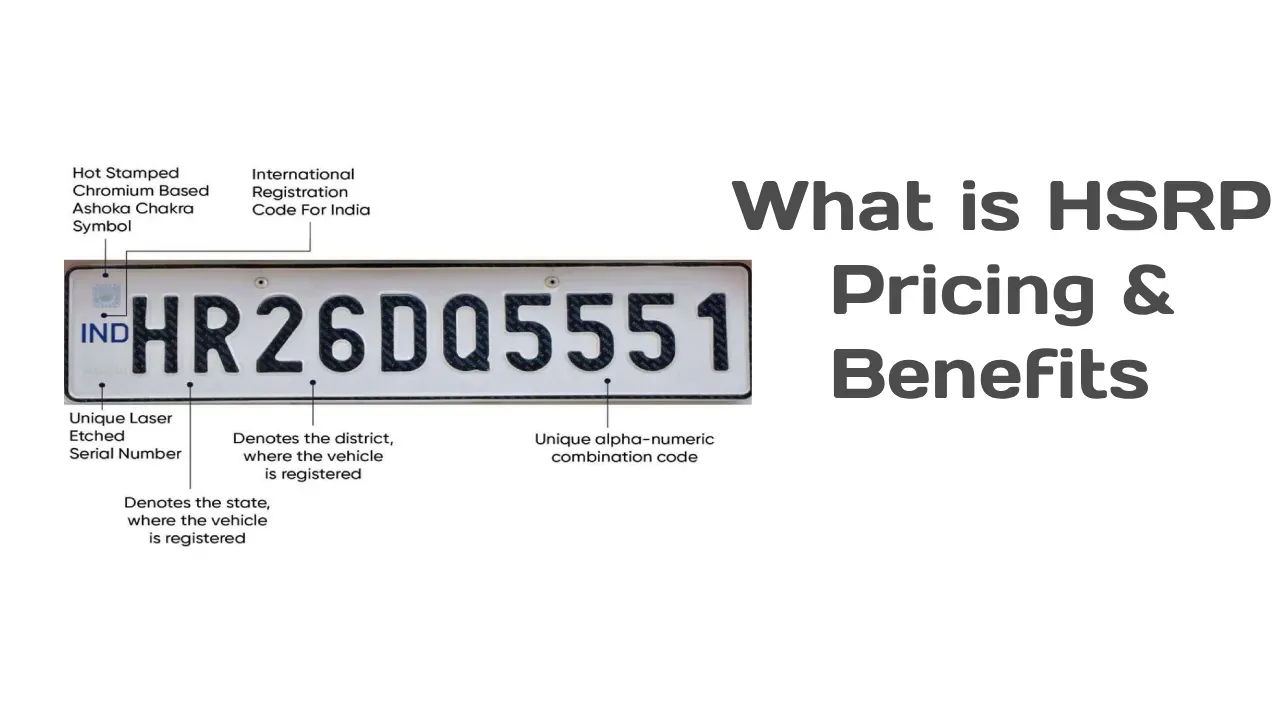
An RTO code is a unique alphanumeric code mentioned on the vehicle’s number plates, specifying under which state RTO is the vehicle registered. States and Union Territories have multiple registering authorities, each identified by an RTO code.
Note: Check out the complete list of RTOs in India at AICDA
Important note: Vahan4Dashboard will be discontinued after August 15, 2026, and directs users to the new Public Dashboard for the latest data.
Disclaimer: The covered details and information can vary depending on the changes in the RTO or state rule. Thus, it is advised to check the RTO website first before applying for any service.
FAQs- RTO
Can I download RTO forms?
Yes, you can download RTO forms through Parivahan Sewa portal.
What is an RTO code?
An RTO code is a unique alphanumeric code, signifying with which RTO the vehicle is registered.
Is motor insurance mandatory for availing RTO services?
Yes, to avail several RTO-related services the vehicle should be insured as per the law.
How many vehicles are registered in 2026?
According to the VAHAN dashboard, 1,96,21,871 vehicles have been registered in 2026 so far, taking the total number of registered vehicles to 44,78,13,195. These figures are subject to change as new registrations are added.
How many RTOs are there in India?
Currently there are 1469 RTOs as mentioned on VAHAN Sewa portal.