About us

Park+ for Business

Valet Services

FASTag

Vehicle Owner Details

E-Challan

New Cars

Car Insurance

Car Loan

Personal Loan

Home >
Car News >
Diy Wireless Android Auto Get Wireless Connectivity In Your Car For Under Rs 2000 Using Raspberry Pi Zero W

DIY Wireless Android Auto: Get Wireless Connectivity in Your Car for Under Rs. 2,000 Using Raspberry Pi Zero W

If you're tired of dealing with wires every time you want to use Android Auto in your car, there’s a budget-friendly solution for you. While many modern cars support Android Auto, most require a wired connection, which can be cumbersome. The high cost of wireless Android Auto dongles, which can go upwards of Rs. 6,000, has left many car owners looking for more affordable alternatives. However, with a little bit of DIY spirit, you can turn your car's head unit into a wireless Android Auto powerhouse for less than Rs. 2,000 using a Raspberry Pi Zero W.

What You Need for the DIY Setup

The core of this DIY project is the Raspberry Pi Zero W, a small and affordable single-board computer with built-in Wi-Fi and Bluetooth. You can easily purchase it online from platforms like Amazon or other e-commerce portals. The Raspberry Pi Zero W typically costs around Rs. 1,240, making it an excellent choice for this low-cost project.
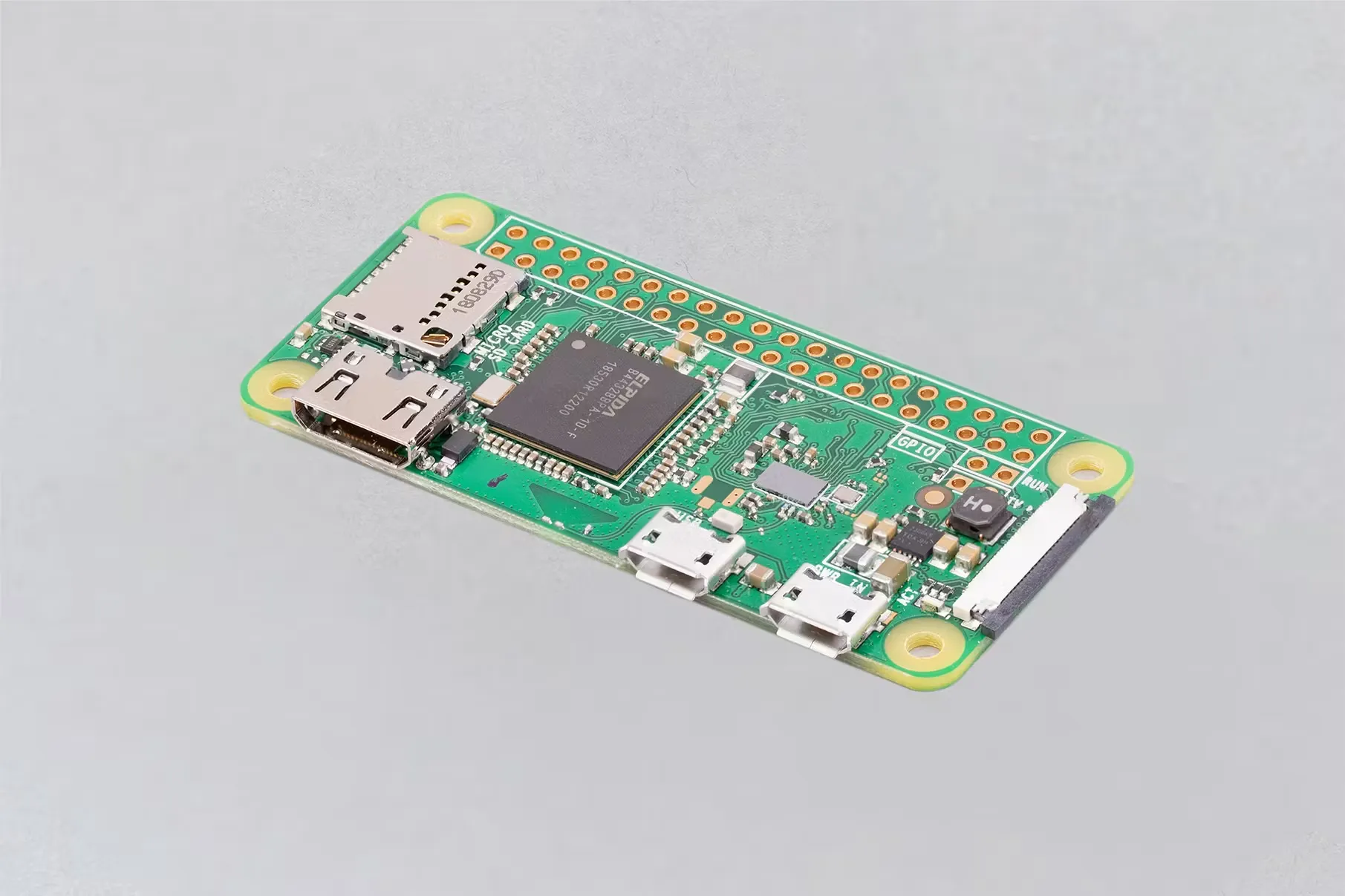
9371b539-77d4-47f1-b89b-aa65b23c9833_RPI+ZERO+W+ANGLE+2+REFRESH_.webp

In addition to the Raspberry Pi Zero W, you'll need a micro SD card, an OEM micro USB cable, an SD card reader, and a heatsink-equipped cover for the Raspberry Pi to ensure smooth operation. Most of these items may already be lying around your home, which helps keep the total cost under Rs. 2,000.

Step-by-Step Setup Guide

  1. Download the Image File: Head to GitHub and download the specific image file for the Raspberry Pi Zero W.

  2. Flash the SD Card: Use a tool called BalenaEtcher to flash the downloaded image onto your SD card. This process will only take a couple of minutes.

  3. Prepare the Raspberry Pi: Once the flashing process is complete, insert the SD card into the Raspberry Pi Zero W.

  4. Set Up in Your Car: Plug your Android phone into your car's head unit using a USB cable to ensure Android Auto opens up on the display. After verifying, unplug the phone and connect the Raspberry Pi to the car's head unit using the same USB cable.

  5. Connect Wirelessly: Wait for the green LED on the Raspberry Pi to glow, indicating it's ready. On your phone, pair with the "AndroidAuto-Dongle" via Bluetooth and connect to the corresponding Wi-Fi network. Voila! You now have wireless Android Auto running in your car.

The Cost Breakdown

  • Raspberry Pi Zero W: Rs. 1,240

  • SD Card: Rs. 250 (estimated value if you already have one)

  • USB Cable: Rs. 100 (estimated value if you have an extra one)

  • Cover with Heatsink: Rs. 350

In total, this DIY project costs roughly Rs. 1,940, making it an incredibly affordable solution for upgrading your car to support wireless Android Auto.

Conclusion

This DIY project using the Raspberry Pi Zero W is a game-changer for those who want wireless Android Auto without breaking the bank. It offers a seamless, wire-free experience, and although it may require some technical setup, the payoff is worth it. This solution works flawlessly with a Nexon, and it should be compatible with any car that supports wired Android Auto, allowing you to enjoy all the features of Android Auto without the hassle of wires.

Also Read:

  1. MG Windsor EV: What to Expect

  2. Xiaomi SU7: A Tech Company's Take on an Electric Supercar

  3. Tata Curvv ICE Variant: A Closer Look at the Striking SUV in Showroom

Latest News

Mahindra XUV 7XO Reservations Start at ₹21,000 in India

The ₹4.10 crore Mercedes-Maybach GLS Celebration Edition was introduced in India.

Local Luxury SUV Launched at ₹2.75 Crore | Mercedes-Maybach GLS Made in India

Iconic Cars Bring the Modern Classic Car Rally 2026 Back to Mumbai

Volkswagen Tayron R-Line Unveiled for India Before 2026 Release

XUV 7XO and Mahindra XEV 9S 93,000+ Reservations on the First Day

JSW Motors Will Introduce the Jetour T2 Plug-in Hybrid SUV in India

Windsor EV Leads, Hector Rises, MG India December 2025 Sales Report

JSW Plug-In Hybrid SUV to Launch in India in June 2026

Toyota Urban Cruiser Pros and Cons: A Comprehensive Review

Annual FASTag Recharge: Why Money Still Gets Deducted at Tolls

5-Seater SUV XL Cars: Spacious and Versatile Options for Your Family

Skoda Rapid Pros and Cons: An Ultimate Guide to the Sedan

7 Seater MG Cars

Audi Q7 Pros & Cons: Is It The Car For You?

Audi India Launches ‘100 Days of Celebration’ Festive Campaign

Toyota Hyryder 7-Seater SUV Spied, Set for 2025 Launch

Maruti e-Vitara: India’s Coolest Electric SUV is Almost Here!

2025 Hyundai Ioniq 5 Facelift spied in India for the first time

Top 10 Cars That Keep You Safe Without Breaking the Bank!

Skoda Peaq Verified as New Electric Flagship SUV with Seven Seats

Mahindra Unveils XUV700 Ebony Edition: A Bold New Look for the Popular SUV

Hybrid Power and Premium Focus Unveiled in the Renault Filante Flagship SUV

Is Maruti Suzuki Swift Worth Buying? - Pros and Cons

Tata Punch Facelift Unveiled with New Features, Powertrains, and Design

Explore Year End Offers

Quick Links
Contact UsBlogsSBI FASTag RechargeTelangana ChallanTech BlogsValet ServicesBug bountyFASTag Annual PassCar NewsCompare CarsCar DealersBoom Barriers
Products
New CarsCar InsuranceE ChallanFASTagParking SolutionsFuel PriceRTOPersonal LoanPersonal Loan EMI CalculatorVehicle Owner DetailsCar Insurance CalculatorCar Insurance Check
Reach us
For support: [email protected]
For Business: [email protected]
Unitech Cyber Park, 5th Floor, Tower A, Sec-39, Gurugram, Haryana 122022
Download Park+ app

Stay on the top of your car game with Park+. Sit back and relax while we take care of your car-related needs, all in one place.

10 Million+
Downloads
footer_separator_img
50 Million+
FASTag Recharges
footer_separator_img
1 Million+
Challans Resolved
google play
app store
© 2026 Park+. All rights reserved
Terms & Conditions | Privacy Policy | Site Map